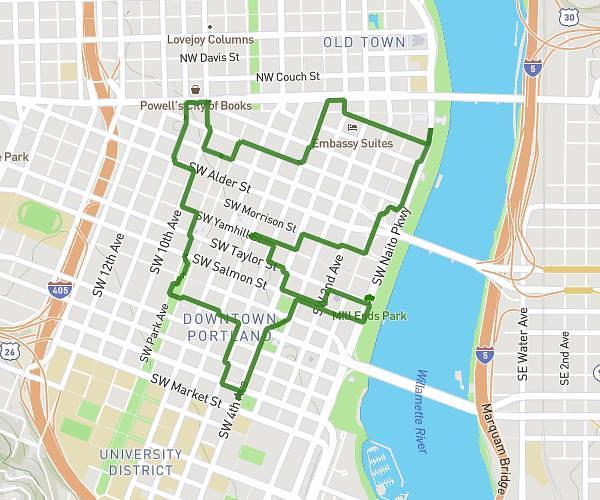
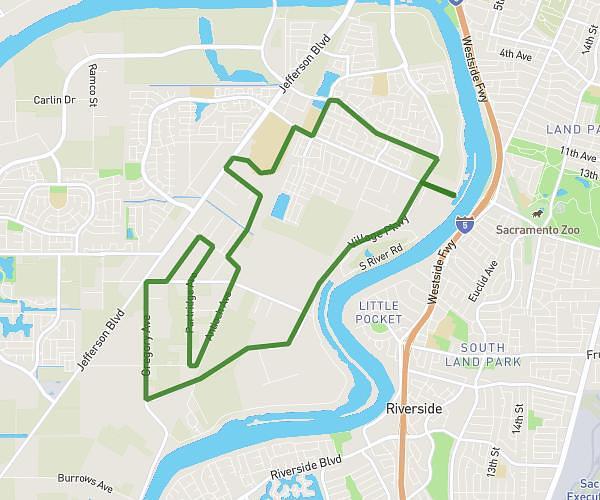
On the MapPlanner website, a feature lets you quickly visualise the area you can reach from a starting point based on the time or distance you want to cover.
This is especially useful for planning a hike, walk, trail run, or bike ride when you have a simple constraint, such as:
-
only 1 hour available to walk
-
a 5 km maximum outing
-
a short walk around a village
-
a quick training session
In seconds, MapPlanner displays on the map the area you can reach on foot, taking into account terrain, elevation, and trails.
This shows you immediately where you can go—and return—within your chosen time or distance limit.
Find a Hike That Matches Your Available Time
When planning an outdoor outing, the main constraint is often the amount of time you have.
For example:
-
a quick 1-hour walk
-
a 45-minute trail session
-
a 2-hour hike
-
a family walk limited to 5 km
Without the right tool, it’s hard to know whether a route truly fits these constraints.
With MapPlanner, you simply set:
-
a maximum time
-
or a maximum distance
The map then instantly displays the reachable area around your starting point.
You can easily identify accessible trails and possible routes.
Plan your own route
MapPlanner helps you calculate distances, elevation, duration and plan your hikes, runs and bike rides on an interactive map.
- Automatic distance & elevation calculation
- Topographic, satellite maps
- GPX/KML export for your GPS
- Real-time GPS tracking
A Reachable Area That Accounts for Elevation
Unlike a simple circle drawn on a map, MapPlanner’s reachable area is far more realistic for outdoor activities.
The calculation takes into account:
-
existing trails and paths
-
terrain relief
-
elevation gain
-
real walking distance
This matters a lot in mountains and hilly areas.
For example, 5 km on flat terrain can be quick, while 5 km with major elevation gain can take much longer.
Because of this approach, the displayed area matches real hiking conditions more closely.
How to Visualise the Reachable Area Around a Starting Point
This feature is very easy to use in the MapPlanner route planner.
Choose a Starting Point
Start by selecting a point on the map, such as:
-
a trailhead car park
-
a village
-
a trail entrance
-
your holiday accommodation
This point will be used as the base for the reachable area calculation.
Set a Time or Distance Limit
You can then set your constraint.
Walking time:
-
30 minutes
-
1 hour
-
2 hours
or maximum distance:
-
3 km
-
5 km
-
10 km
The map automatically calculates the areas reachable on foot.
Explore Accessible Trails
A zone appears around your starting point. It represents all locations you can reach while staying within your time or distance limit.
You can then:
-
explore trails within this zone
-
identify possible loops
-
build an itinerary that fits your constraint
This method helps you find hike ideas quickly.
A Very Useful Tool for Planning Outdoor Outings
Visualising the reachable area around a point is helpful in many situations.
Find a Short Walk
If you have limited time, you can instantly see trails suited to a quick outing.
It’s ideal for:
-
a walk after work
-
a short trail run
-
an evening power walk
Discover Trails Around You
When travelling or visiting a new region, it can be hard to know where to go.
By showing the reachable area around your starting point, you can:
-
spot trails easily
-
identify potential loops
-
discover new routes
Match the Outing to Your Level
This feature also helps you adapt the outing to your goal:
-
short family walk
-
sporty route
-
trail training
-
bike ride
Just by limiting the distance or time.
A New Way to Find Hiking Ideas
Visualising a reachable area changes how you plan an outing.
Instead of searching for a specific route immediately, you can explore what’s possible around you first.
This helps you:
-
discover trails you wouldn’t have considered
-
imagine new loops
-
adapt the outing to your available time
It’s a simple, effective way to plan a hike or walk.
Try This Feature in MapPlanner
If you want to plan an outing that matches your available time or the distance you want to cover, you can use the MapPlanner route planner.