How long were you actually moving on Sunday, once the breaks are taken out? MapPlanner helps you track your hiking, trail running and cycling performance: actual time, moving speed and heart rate, outing after outing.
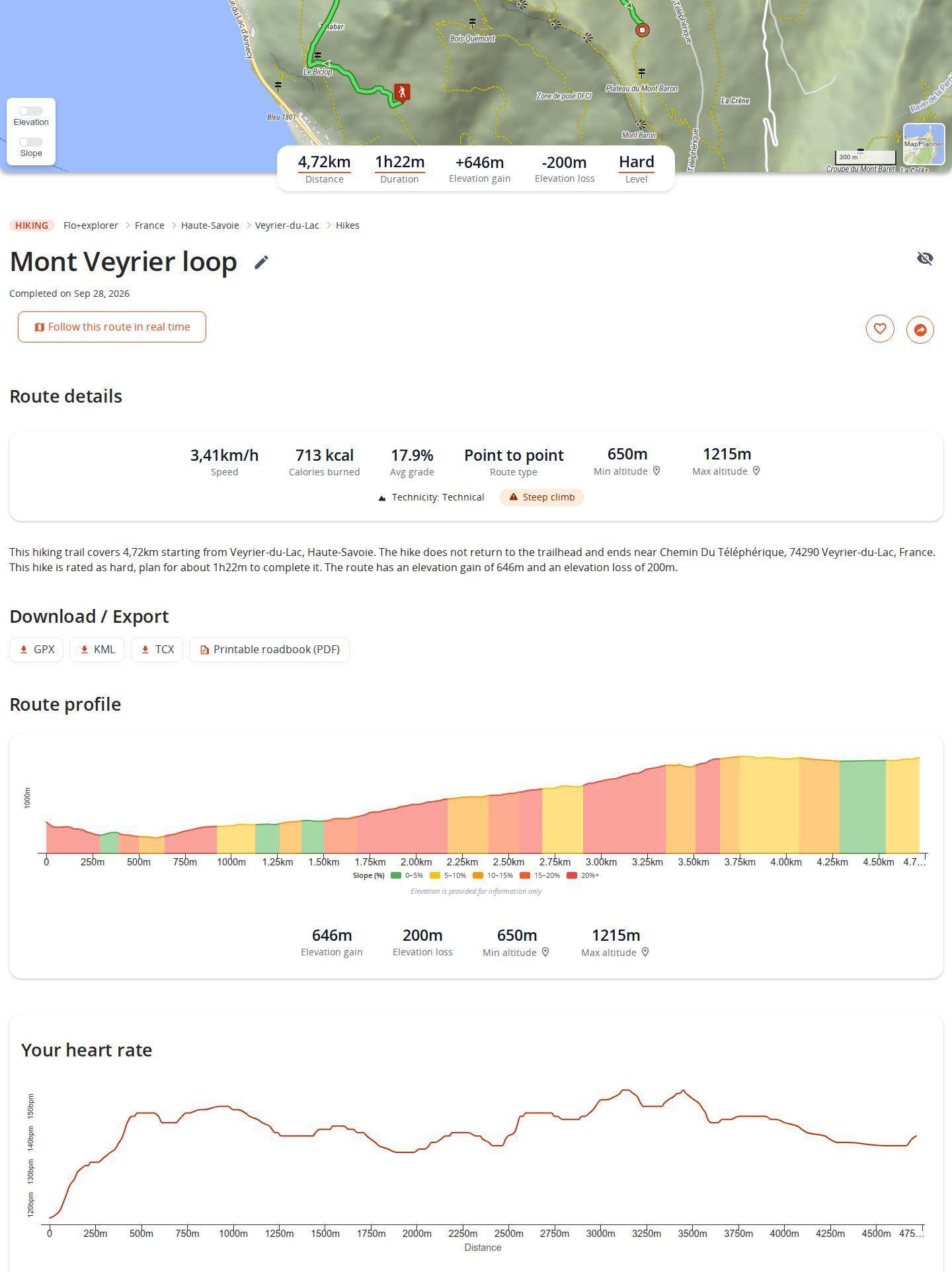
The planned line is only half the story. Back home, you record what really happened, either by marking your planned route as completed or by importing the track from your watch or GPS device. The outing then joins your history and your records. It also sharpens the estimated times of your next routes.
Two ways to log a completed outing
From a planned route
Open its page and choose Mark the route as completed. A short form asks for the date, then your time or your speed: fill in one and the other is worked out for you. You can also enter your break time, which is taken out of the performance figures.
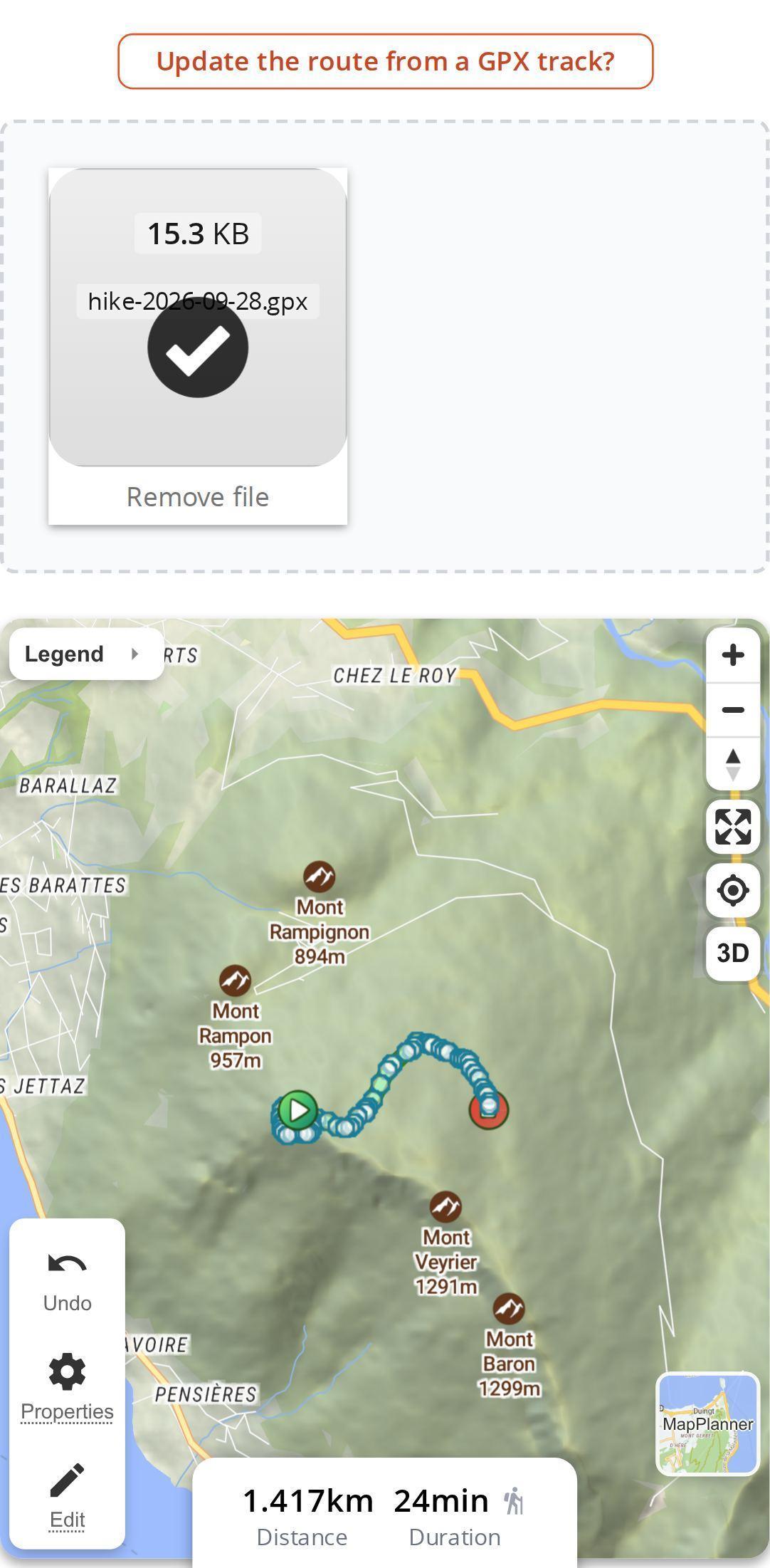
Wore a watch? On the same page, update the route from your GPX file: your real track replaces the planned line, with the distance and time you actually recorded.
From your watch or GPS track
From the route creation menu, choose Import a GPX and drop in your file: GPX, FIT, KML, KMZ, JSON or GeoJSON. Mark it as a completed outing rather than a plan, check the date and save. The guide to importing and exporting tracks covers the supported formats in more detail.
When the file is timestamped, MapPlanner picks up your actual time and spots your breaks. If your watch recorded heart rate, that data comes in too.
Plan your own route
MapPlanner helps you calculate distances, elevation, duration and plan your hikes, runs and bike rides on an interactive map.
- Automatic distance & elevation calculation
- Topographic, satellite maps
- GPX/KML export for your GPS
- Real-time GPS tracking
Speed based on moving time
A twenty-minute sandwich stop at the summit should not wreck your average. MapPlanner keeps total time and break time apart, so the speed or pace shown on the outing's page reflects only the time you were on the move. Break time stays visible in the route details. You end up comparing outings on what matters, your pace, not the length of the picnic.
Your heart rate, mile after mile
For an imported outing with heart rate data, the route page shows a heart rate chart in beats per minute along the whole distance. Read it alongside the profile: you see where the effort peaked (on the final climb of a trail run, for instance) and where you recovered on the flat or downhill.
Only you can see this chart. It is part of the Explorer plan; without a subscription, a short message explains what the plan includes.
Compare outings and improve
Every completed outing lands on your My activities page, reached from the menu of the same name, with totals, averages and records per activity. The guide to your outing history walks through it. A few ideas depending on what you do:
- for running, sort your runs by duration or distance and keep an eye on your fastest average;
- for trail running, your elevation gain record points to your toughest outing, the benchmark for the next one;
- for hiking, the highest altitude reached and the longest duration sum up your best days out;
- for cycling, filter by period to compare your totals from one month or season to the next.
Estimated times that match your pace
Completed outings have a second use. For each activity, MapPlanner works out your personal speed from your recent outings, taking each one's terrain into account. The estimated times of your next routes then follow your current form rather than a general average. Only routes you actually completed count: a route you merely planned says nothing about your pace.
Tips for reliable tracking
- Import the original file from your watch (FIT or a timestamped GPX) rather than a redrawn track: that is where the time, breaks and heart rate live.
- Check the completion date before saving: it puts the outing in the right period of your history.
- Enter your breaks when you mark a route as completed by hand, so your speed comes out right.
- Log the everyday outings too, not just the big days: the fuller your history, the closer the estimated times get to your real pace.
Start with a free account
Logging outings needs a free account, which lets you save and import a limited number of routes. The Explorer plan lifts those limits and adds the heart rate chart to your imported outings.
Your next outing starts here: plan it in the route planner, then mark it as completed when you get back and see how you really did.
Performance tracking: common questions
How do I log a hike I have already done?
Import the track from your watch or GPS device through the route creation menu. You can also open the planned route and mark it as completed to enter the date and your time.
Which watch files can I import?
GPX, FIT, KML, KMZ, JSON and GeoJSON. A timestamped file brings in your actual time and breaks, plus heart rate if it was recorded.
Do breaks count toward my average speed?
No. Break time is taken out: speed is calculated on your moving time only.
Is heart rate tracking free?
The heart rate chart is part of the Explorer plan. Logging your outings stays free with an account.


